How to build a KOL territory map from a team scope
Four answers scope a team, the engine seats a panel for that stage and territory, you open the records of the people you will engage, and the congress calendar makes it a plan.
By FindMyKOL Team11 min read4 steps
Key takeaways
- A team in the FindMyKOL workspace is a scope: one product, one or more indications, a lifecycle stage and a territory. The panel is built from those four answers.
- Eight archetypes seat the panel, each from a named public record. The records are a led industry trial, an investigator-run trial, a K award, a guideline or society role, Medicare volume, or a P&T committee roster.
- The stage decides the mix. A preclinical asset weights early-career investigators and IIS leads; a lifecycle-management drug weights high-volume treaters and guideline authors.
- Territory ranks the panel, it never hides anyone. Saving and assigning KOLs is separate from opening their itemized records, and an opened record stays open.
- FindMyCongress lists every society meeting with its source, and each meeting's page on FindMyKOL names the KOLs on its program with their roles, so the panel becomes a dated plan.
To build a KOL territory map, scope a team by product, indication, stage and states, let the engine seat a panel from the public record, open the records of the people you will engage, and date the outreach against the congress calendar. This walkthrough does each step in the FindMyKOL workspace.
A territory map answers the three questions a medical director asks in the first planning meeting. Who matters for this product in this indication? Who on the team covers each of them? When will you see them? Most teams answer the first with a spreadsheet, the second from memory, and the third with a congress list someone forwarded last year.
This walkthrough builds all three from the public record, and every screenshot comes from one real run on 4 November 2026. It is written for the team lead or MSL manager who scopes the territory. An MSL who inherits a board can start at step 3. If you only need a first list for one region, the starter list walkthrough does that from the directory with two filters.
Three things to know before you start. Teams live in the workspace, which any account can create. The archetypes and scores inside it are judgments, so they stay in the workspace and never appear on a public profile page. And every seat the engine fills carries a receipt that names the records behind it, so you can check any name before you act on it.
- 1
Scope the team in four answers
Open New team in the workspace. The form asks four questions, and the panel on the next screen is built from nothing else. The run below scoped a team called Myeloma Midwest.
Product. Search the directory's drug list and pick your product. Typing Darzalex offered Daratumumab from the directory, and beside it the option to use Darzalex as a pre-name label. A pre-name product has no directory record, so the panel is routed on indication alone.
Indication. Pick one or more. A named drug shortlists the indications its label and trials assert, with the size of each engaged cohort beside it, and you can search for any other. A pre-name product needs at least one, because there is no label to fall back on.
Stage. Pick one of five. The directory derives a default from the FDA label and the ClinicalTrials.gov phase record. Your declaration wins: a team that calls a phase 3 asset "late clinical" gets the late clinical mix.
Stage What the panel is for Preclinical The scientific advisors who will shape where a pre-name asset goes once it enters the clinic Early clinical Investigators who can run early studies and build the investigator base for later trials Late clinical Convert investigators into advocates and start moving the treatment algorithm before approval Post-approval Move the algorithm, educate on administration, and reach the people who treat Lifecycle management Broaden the network for an approved drug on new research or new access, and find the patients still undiagnosed Territory. It starts global. Click the US tiles to pick states, or leave it and narrow it later from the Teams screen. The five US regions follow MSL territory lines rather than census divisions: Northeast, Southeast, Midwest, South Central and West. Territory ranks the panel, it does not filter it: a seat goes first to someone in your states, then to the region, and the rest stay reachable. Ex-US coverage is publications only, so ex-US fits arrive as mentions, never seated for you.
One optional answer: peers and competitors. Pick companies and the panel either excludes or keeps only the people they paid for services or research in the last four years, from CMS Open Payments. Meals, travel and gifts do not count. Leave it empty to ignore payments.
The second screen shows the stage mix as cards, one per archetype, each with the share of seats it gets, why it matters at this stage, and how the engine screens for it. The wizard proposes a panel of 25 seats. The whole run, from the first answer to a seated panel, takes under two minutes:
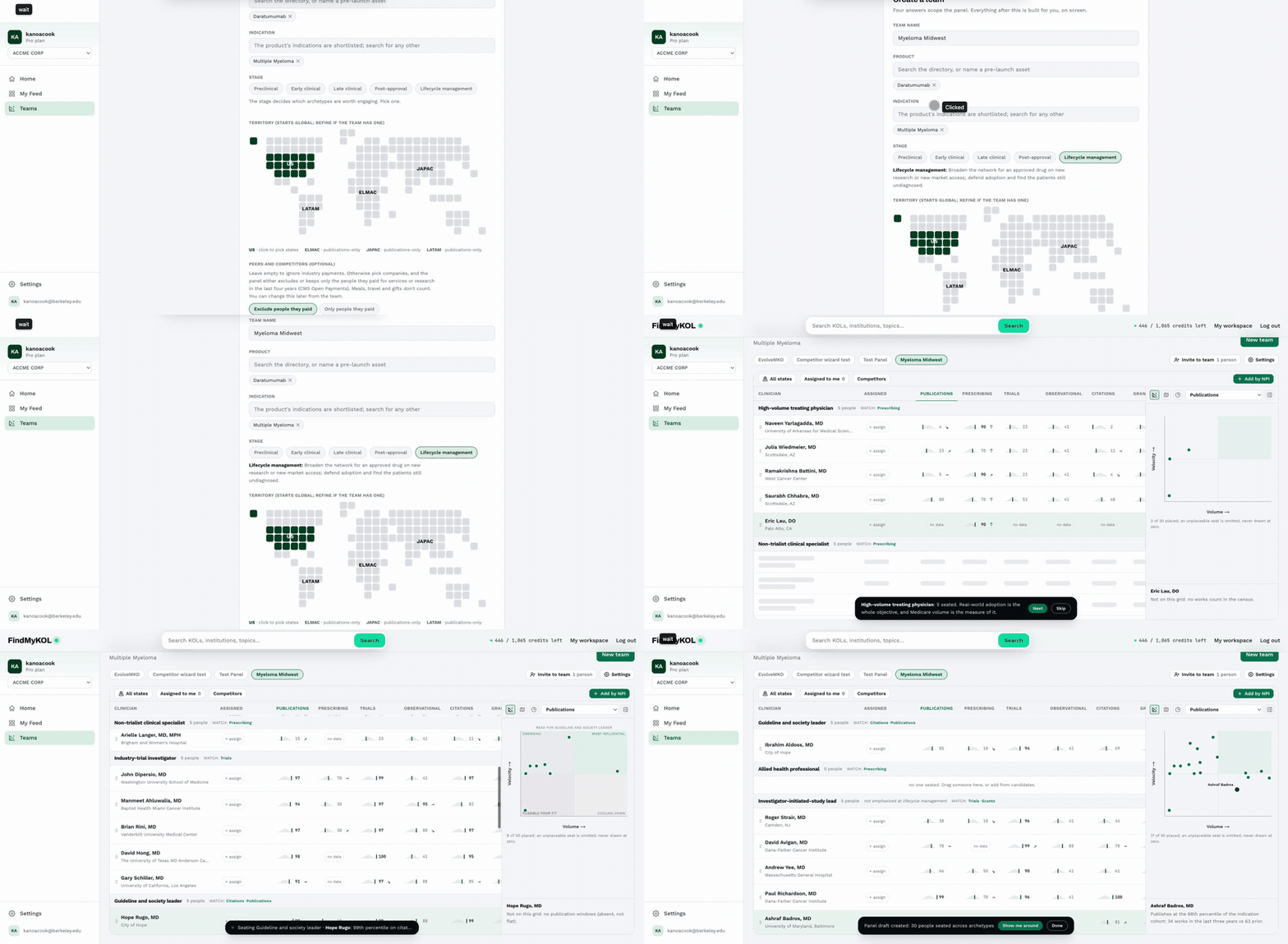
Daratumumab, multiple myeloma, lifecycle management, US: four answers, then thirty seats. 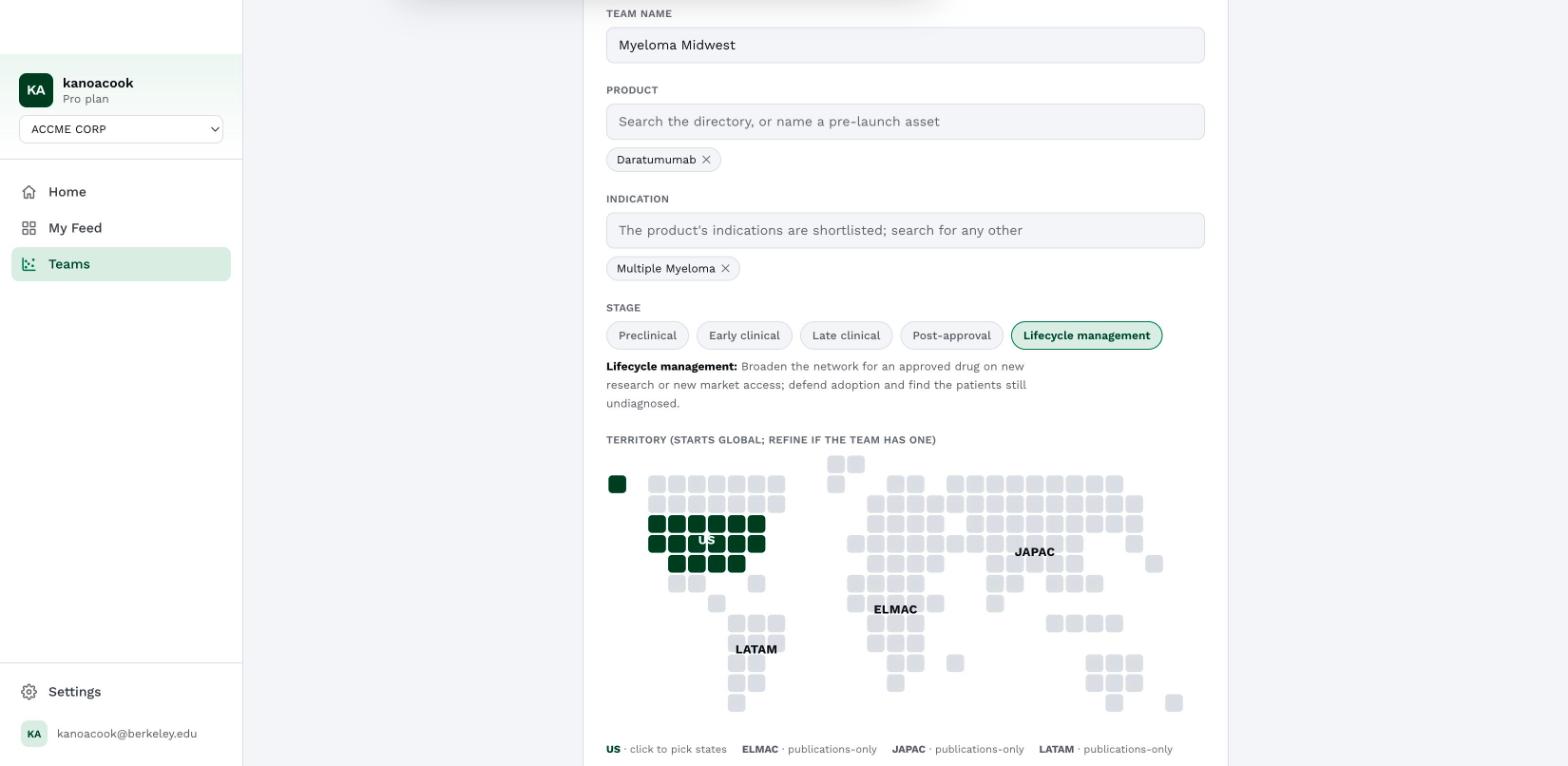
Step 1 of the wizard: name, product, indication, stage and territory. Nothing else shapes the panel. - 2
Read the panel the archetypes build
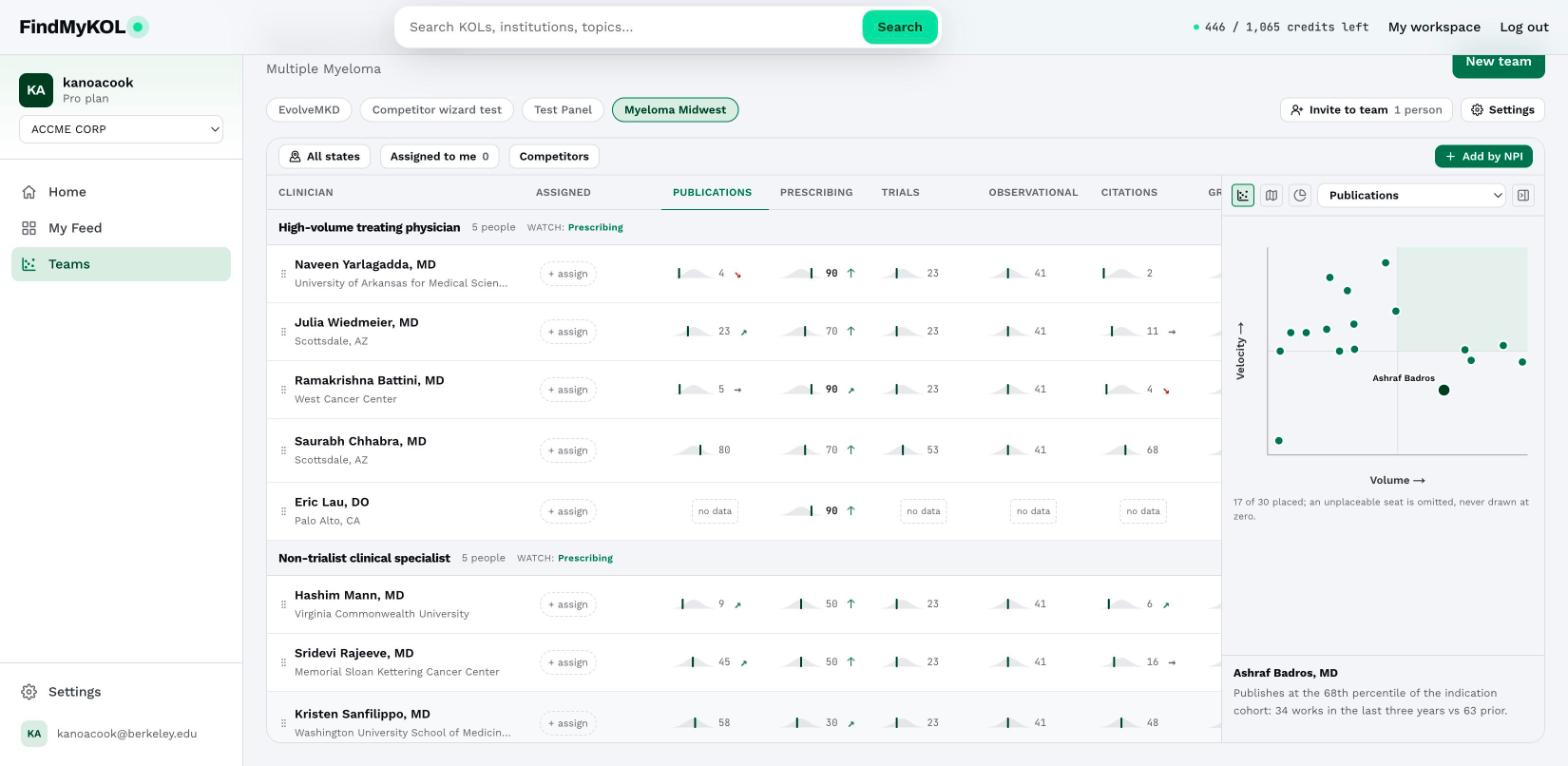
The team opens on the Teams screen with the roster grouped by archetype. Each person sits under one archetype, their highest-scoring one, and each group header names the dimension that archetype is watched on. Every row shows the person's level in the indication cohort as a small bell and their recent direction as an arrow, across publications, prescribing, trials, observational studies, citations and grants. The rail on the right plots the same people on a volume-versus-velocity grid.
Eight archetypes exist. Each is seated by one observable in the public record. None is seated by a title or an affiliation:
- Industry-trial investigator. Leads a trial in your indication whose lead sponsor ClinicalTrials.gov classes as industry. A company's own study director does not count.
- Investigator-initiated-study lead. Leads a trial the registry records as investigator-run. A company-supported IIS, where industry is the collaborator, is the strongest signal.
- Early-career investigator. Holds an NIH K08, K23 or K99 award from the last four fiscal years, with a short career since first publication.
- Guideline and society leader. Sits on a guideline panel or holds a role that decides something at a society: president, board, editor in chief, program committee. Fellowships and memberships never count.
- Non-trialist clinical specialist. A physician with a research footprint in the indication and no trial-leadership row in it. Seated for regional spread, not score.
- High-volume treating physician. Medicare volume against the indication's drug codes, banded, never a raw count. Research is a differentiator here, not a requirement.
- Allied health professional. An NP, PA, pharmacist or nurse the Medicare files observe against the same drug codes. Existence and placement only, never an influence tier.
- Payer and formulary decision maker. Named on a public P&T or DUR committee roster or in its minutes. Nothing else seats this slot.
The stage sets how many seats each archetype gets. In November 2026 the mixes read like this:
Stage Largest slots Preclinical Early-career 35%, IIS leads 35%, guideline and society 30% Early clinical Industry-trial 40%, IIS leads 27%, early-career 25% Late clinical Industry-trial 30%, guideline and society 25%, IIS leads 20% Post-approval High-volume treaters 30%, guideline and society 25%, industry-trial 20% Lifecycle management High-volume treaters 30%, specialists 20%, guideline and society 20% Three controls make the panel yours. Open All states and pick the states the team covers; each tile counts the panel members already there. When you close the picker the engine compares the best-fit panel for the new territory with the one you have, names who would join and who would leave, and waits for you to update or keep the current panel. For Myeloma Midwest, narrowing from every state to the twelve Midwest states would swap 26 seats in and 25 out:
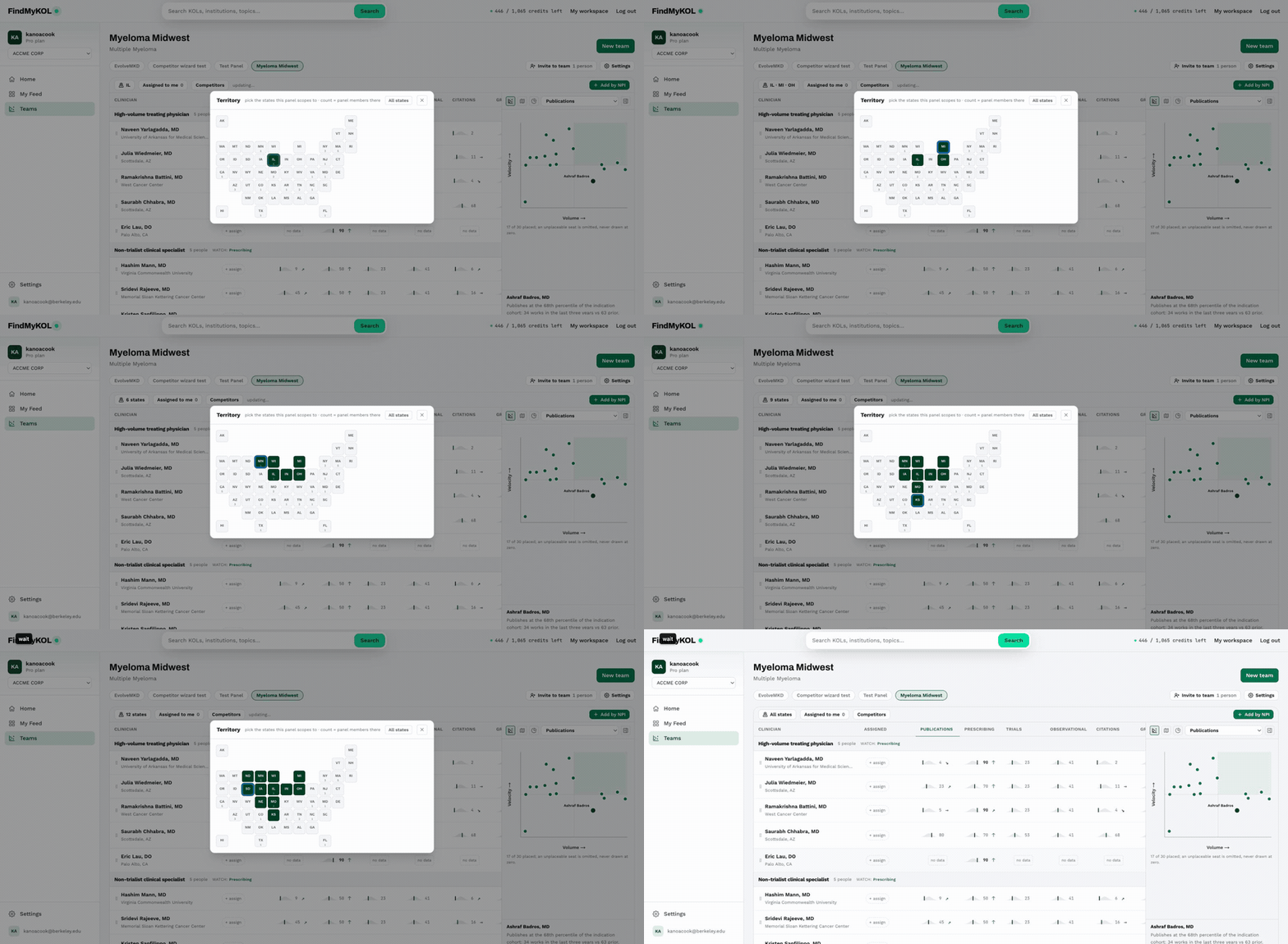
Territory re-ranks every archetype inside the states you pick, and shows the swap before it happens. Drag a person to another archetype when you know better; the row then carries a manual chip and keeps the engine's suggestion in its tooltip. Add from candidates to see the whole indication cohort for a slot, or add by NPI to pull known names in from your own spreadsheet.
Archetypes and scores are judgments. They live in the workspace and never appear on a public profile page, which only states the record.
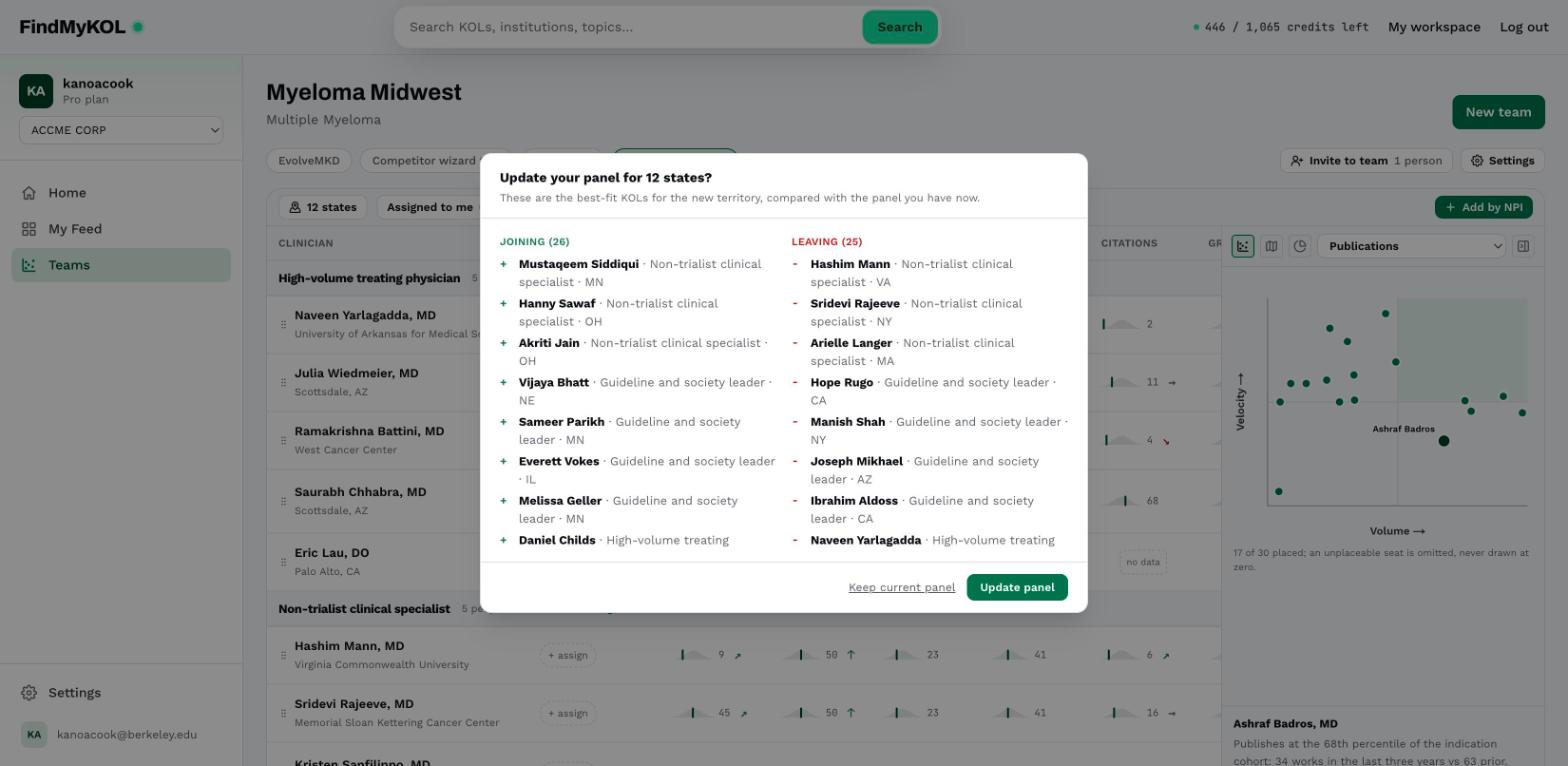
Territory is a ranking input. The engine shows the swap for the new states and leaves the decision to you. - 3
Open the records of the people you will engage
Saving is separate from opening a record, and opening one is deliberate. Any account tracks KOLs, and assigning them and logging activity happen on the board. A public profile already shows the aggregate layer, every count and year cited to its source. The itemized layer, every trial, payment, grant and publication as a row, plus the FindMyKOL type (Elite, National or Regional), opens with the Unlock button on the profile.
An unlock is per person, one-way and permanent. A second click changes nothing, and removing someone from every panel does not close the profile. Open the records of the seats you will act on, not the whole roster. Open the profile, read the receipt behind the seat, and confirm the trials and roles are this person's before you open the itemized record. Namesakes are the main error in any KOL list, and the engine refuses a trial row shared by two same-named people, but a single-record namesake can still get through. Reading every trial a physician has worked on is the check.
Then assign. A team lead or workspace admin assigns each KOL to one or more MSLs from the roster's Assigned column. Each member gets one board per team they sit on, every member can read every board, and a Personal board holds the people an MSL tracks alone. Two MSLs can hold the same KOL on purpose, for example across two products in one territory.
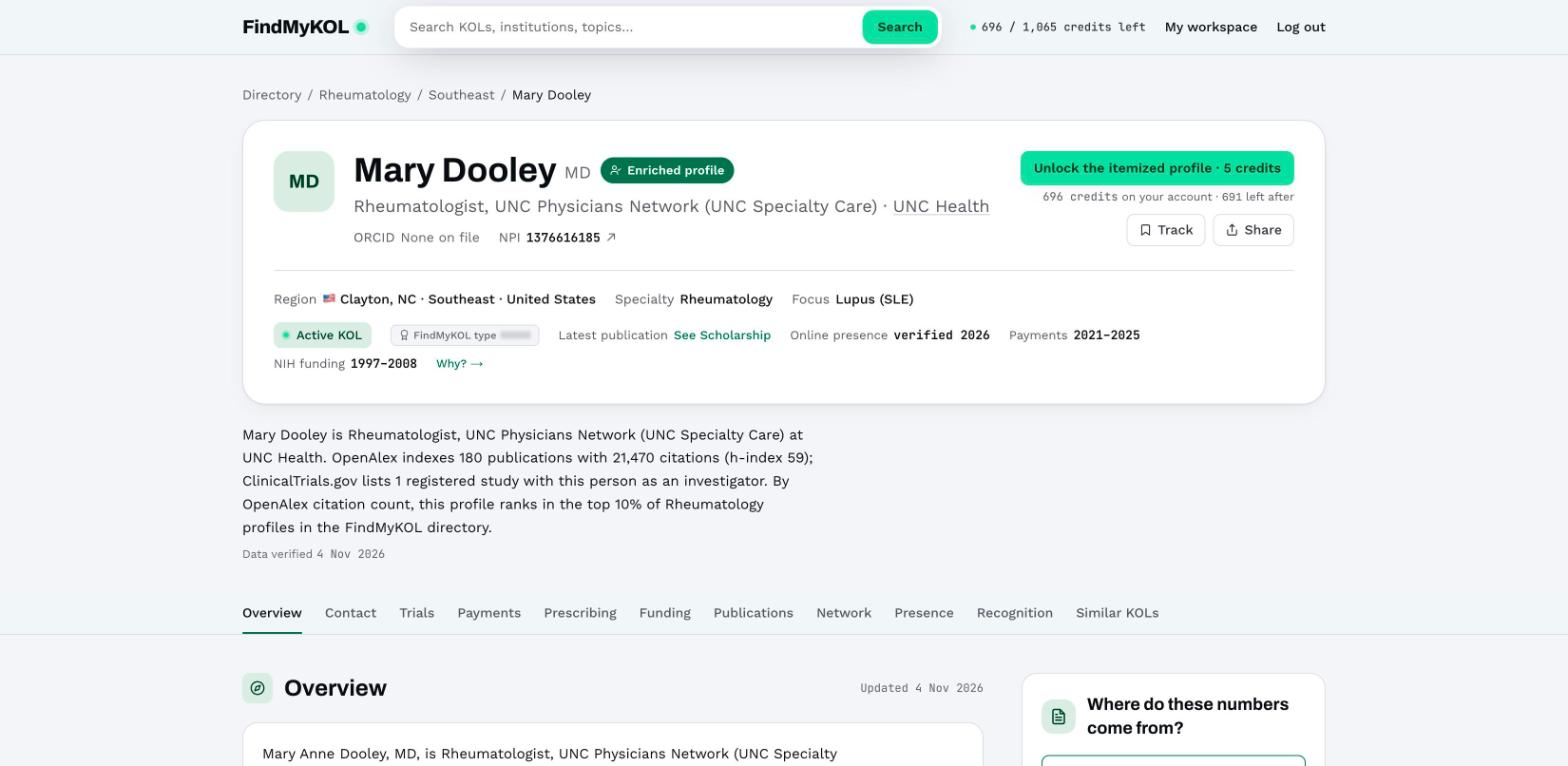
One button opens the itemized record, and it stays open. - 4
Take the panel to the congress calendar
A panel becomes a plan when it has dates. FindMyCongress is a public calendar of medical society meetings read from each organizer's own site. Each meeting carries its dates, city and source, the day we last checked that source, and a provisional label until the organizer confirms. On 4 November 2026 it listed 347 meetings in the next 12 months from 388 societies read.
Filter the calendar to your therapeutic area, to the US or Europe, or to meetings whose abstracts we cover, and switch between month and list views. Subscribe to the calendar feed to get the meetings into your own calendar. Each meeting card shows how many people from our pages presented at the last edition and links to Who is presenting on FindMyKOL. That page names the KOLs on the meeting's published program with their roles, invited speaker or session chair, and lists everyone with a recorded role at the society. Signed in, a quadrant grid ranks the people on the page against each other on the dimension you choose. The abstracts and accolades behind each name open with an unlock.
The plan writes itself from there, one quarter at a time:
- List the meetings in the next two quarters that touch your indication.
- For each, open Who is presenting and read who from your panel is on the program or holds a society role.
- Assign the pre-meeting contact to the MSL who holds that KOL, and note the session where the data is.
- For seats nobody on the panel covers at that meeting, open the people with roles and decide whether one belongs on the roster.
One honest limit. Some societies refuse automated reading, and a society with no row has not been read. It has not been shown to hold no meeting. Podium roles come from the meeting's own program, abstracts are attributed through the author record and never by name alone, and there are no attendee lists and no booth data, by design.
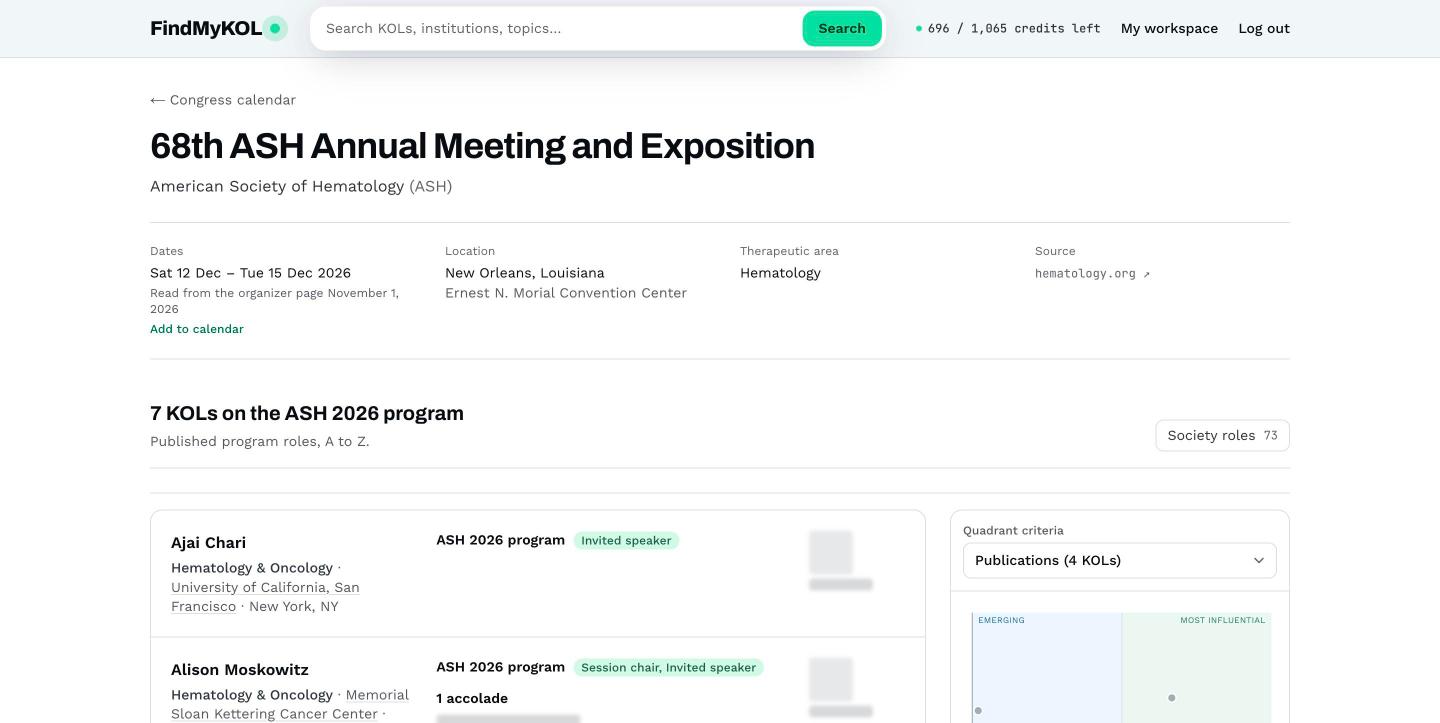
Who is presenting at ASH 2026: program roles from the meeting's own program, and a grid that ranks the people on the page.
Where the data stops
The map is built from public records, so it knows what the records know. It does not know who is accessible, who prefers MSL contact, or what your company's CRM already holds; keep that in the CRM under its compliance rules. Prescribing volume comes from fee-for-service Medicare only, so Medicare Advantage, commercial and pediatric volume are absent, and the files lag about 17 months. Ex-US coverage is publications only. The congress calendar covers the societies that let us read their pages. The KOLs on a meeting page come from the published program we hold, which can be the previous edition when the next program is not out yet.
Every seat carries its receipt, so when a name surprises you, read the records before you accept or remove it. Then start with the four answers at New team.
Questions
- What is a KOL territory map?
A KOL territory map is the set of key opinion leaders a field team plans to engage for one product in one indication across a defined geography. It records who covers each person and when. In FindMyKOL it is a team scope plus the archetype panel built from it, the assignments on each member's board, and the congress calendar that dates the outreach.
- Is there a territory plan template for MSLs?
A workable territory plan has four parts: the scope (product, indication, stage and states), the list of KOLs with the reason each is on it, who on the team covers each person, and the dated outreach, usually tied to the congresses in the next two quarters. This walkthrough builds each part from the public record; your company's CRM holds the interaction plan.
- How many KOLs should a territory map hold?
The wizard proposes a panel of 25 seats across the archetypes the stage calls for, and a lead can add or remove seats; the Myeloma Midwest run seated 30. Most teams act on the 20 to 40 people they will actually reach in a year, and keep the rest of the indication cohort reachable through the candidates view.
- How do I find regional conferences in my territory?
FindMyCongress lists society meetings read from each organizer's own site, with dates, city and source, and filters by therapeutic area and region. Each meeting links to the KOLs on its published program. Societies that block automated reading are missing, so check the ones you know in your territory by hand.
- Is the archetype a public rating of a physician?
No. Archetypes and scores are judgments, and they stay inside the workspace. Public profile pages state the record only: trials, publications, grants, payments and congress activity, each cited to its source. The FindMyKOL type is shown only on unlocked profiles.
- Does the territory hide KOLs outside my states?
No. Territory ranks the panel instead of filtering it. Someone in your states is seated before someone in the region, and both before someone across the country, but everyone stays reachable from the candidates view. When you change the states, the engine shows who would join and who would leave before anything changes.
- Can two MSLs hold the same KOL?
Yes. Assignment is many-to-many on purpose. Usually one MSL holds a KOL, but a second MSL can hold the same person for another product, indication or territory. Every member of the workspace can read every board, so double coverage is visible rather than hidden.